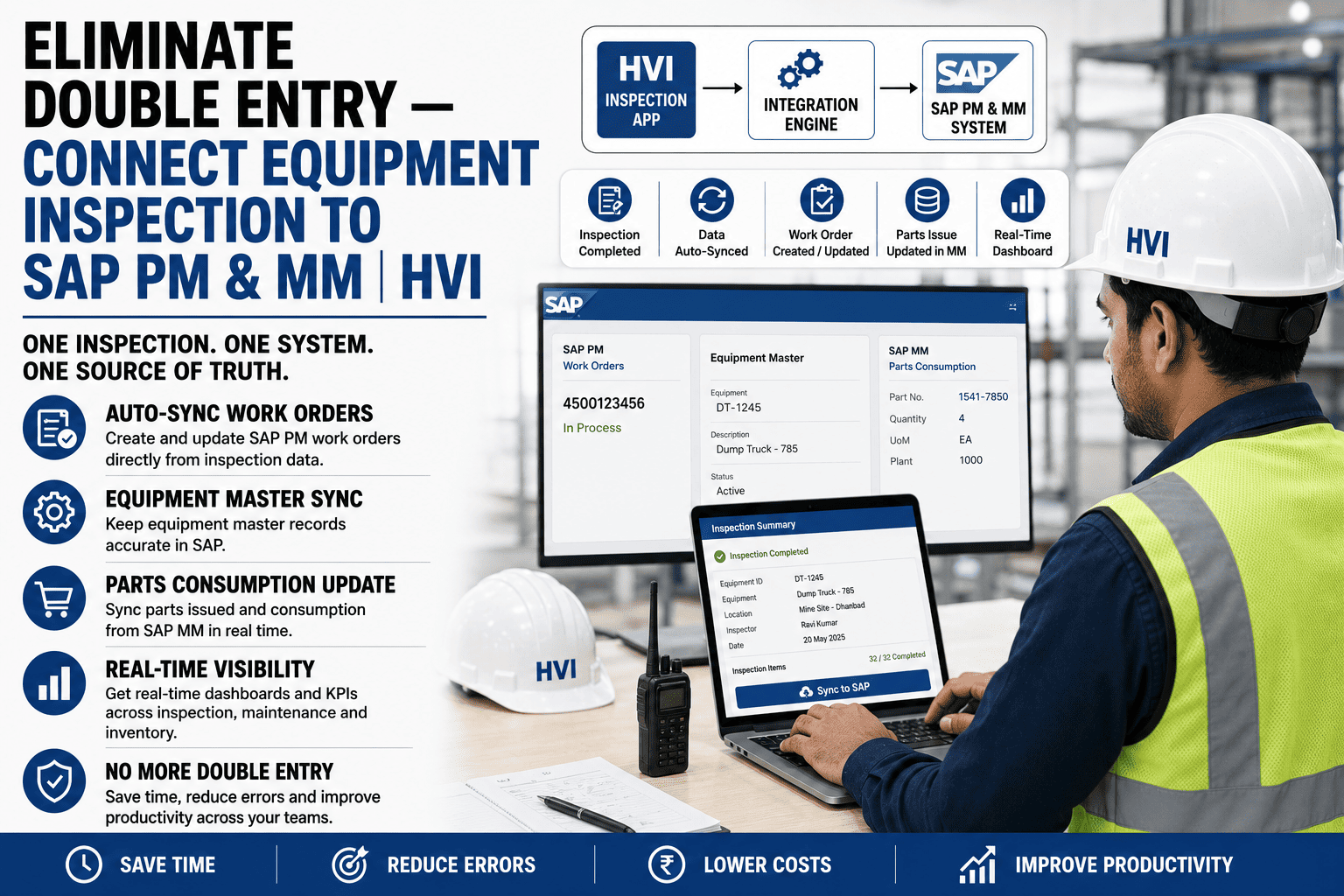
Every SAP-running fleet in India knows the routine: technicians record repairs on paper, then clerks re-enter them into SAP days later. This creates double entry, posting delays, errors, and mismatched records between the field and head office. HVI removes this gap by acting as SAP’s field-capture layer, letting teams capture inspections, work orders, meter readings, and parts usage on mobile—even offline—then sync them to SAP PM and MM through standard interfaces. SAP remains the system of record, while every field transaction stays traceable to the user, timestamp, and location where it was captured. One entry, at the point of work, flowing everywhere it belongs — sign up free and map your first equipment this week.
Eliminate Double Entry — Connect Equipment Inspection to SAP PM & MM
Mobile field capture at the machine, standard-interface posting into SAP — notifications, orders, measurement documents, and goods issues created from real work, not retyped from paper, with SAP staying the system of record.
What the Double-Entry Tax Actually Costs
Every inspection result, order confirmation, and goods issue keyed twice — field paper first, SAP second — consuming two to four clerk-hours per site per day that produce nothing new.
SAP shows last week's reality: orders confirmed late, stock consumed but not issued, availability reports built on stale data — so planning runs on phone calls anyway.
Wrong equipment numbers, transposed quantities, parts costed to the wrong order — manual re-entry error rates land in the low percent range, and every one distorts a cost report somebody trusts.
The deeper cost is behavioural: because SAP entry is painful, the field delays it, batches it, and shortcuts it — and the ERP the enterprise runs on becomes a lagging copy of registers and Excel sheets it was meant to replace.
One Capture Point, Two Systems in Sync
SAP (System of Record)
Equipment masters, functional locations, material masters, cost centres, and approval workflows live in SAP — untouched, authoritative, and governed exactly as your CoE runs them today.
HVI (Field Capture Layer)
Operators and fitters work on mobile at the machine — checklists, photos, work orders, parts issues — fully offline at remote mines, syncing when signal returns with capture-time stamps intact.
Equipment, functional locations, materials, and cost objects sync from SAP into HVI — the field always works against SAP's own IDs, never a parallel list.
Defects, orders, confirmations, meter readings, and parts consumption post from the field into PM and MM through standard interfaces — validated by SAP's own rules on arrival.
How Field Records Map to SAP Objects
| Captured in HVI at the Machine | Posted in SAP | What That Gives You |
|---|---|---|
| Inspection defect with photo and severity | PM Notification (e.g., M2) on the equipment | Every field-found defect enters SAP's maintenance history the moment it syncs |
| Work order executed by the fitter | PM Order with operations and confirmations | Order status and labour hours in SAP without a clerk touching a keyboard |
| Spare issued at the site store | MM goods issue against the order (mvt 261) | Real-time stock and true parts cost on the right equipment, first time |
| Daily meter reading from the operator's checklist | PM Measurement Document on the measuring point | Counter-based maintenance plans in SAP fed fresh readings daily, not monthly |
| Machine and location data | Equipment Master / Functional Location (synced down) | One asset identity across both systems — no parallel numbering, ever |
Bring Your SAP Landscape to a 30-Minute Integration Session
ECC or S/4HANA, PI/PO or CPI, tightly governed or pragmatic — bring your Basis or PM module owner along, and our India team walks the exact object mapping, interface options, and a realistic pilot plan for one plant or project. You leave with the integration architecture on one page and a working field demo on a phone.
Three Ways to Connect — Matched to Your Landscape
Standard APIs / OData
For S/4HANA and API-enabled ECC landscapes — near-real-time posting through released interfaces, typically routed via CPI or your integration middleware, with your CoE's monitoring on every call.
BAPI / IDoc
The classic ECC route your Basis team already trusts — notifications, orders, confirmations, and goods movements through the same released BAPIs and IDocs your other satellites use.
Governed File Exchange
For locked-down environments where nothing touches SAP directly — scheduled, validated batch files into your existing upload framework, with reconciliation reports proving completeness run by run.
The Three Questions Your SAP Team Will Ask — Answered
"Does SAP stay the system of record?"
Yes — masters are authored in SAP and synced down; HVI never creates equipment, materials, or cost objects on its own. Finance closes the month in SAP exactly as today, with better data underneath it.
"What stops bad postings from the field?"
SAP's own validations — postings go through released interfaces and hit the same checks as any transaction: valid equipment, open order, stock available, authorised movement type. Rejections queue with reasons for correction, never silently vanish.
"Can we audit what crossed the bridge?"
Every synced record carries its field origin — user, capture timestamp, GPS, photos — linked to the SAP document number it created. The interface log reconciles both sides daily, and auditors can walk any SAP order back to the phone it started on.
Frequently Asked Questions
Do you support both ECC and S/4HANA?
Yes — S/4HANA via OData/APIs (direct or through CPI), and ECC via BAPIs/IDocs or your PI/PO layer, with the governed file route available for either. The object mapping is identical across versions, so a future S/4 migration does not disturb the field layer at all.
How do offline sites at remote mines affect SAP posting?
Field records queue on the device with capture-time stamps and post when the site syncs — SAP documents carry the true work date, so period postings and counter readings stay accurate even when connectivity lags by hours or days. The dashboard shows per-site sync freshness, so nobody mistakes lag for absence.
Who maintains equipment and material master data?
Your SAP team, exactly as today — masters flow one way, down. New machines are created in SAP and appear in the field app on the next sync; the field can request a master (flagged to your MDM process) but never invent one. That single rule prevents the parallel-numbering mess integrations are feared for.
How long does the integration take to stand up?
A one-plant pilot — masters synced, one interface route live, field crews capturing — typically runs two to four weeks depending on your change-control calendar, with the field app itself live on day one against synced masters. Scale-out after the pilot is configuration, not a new project; sign up free and start the master sync conversation this week.
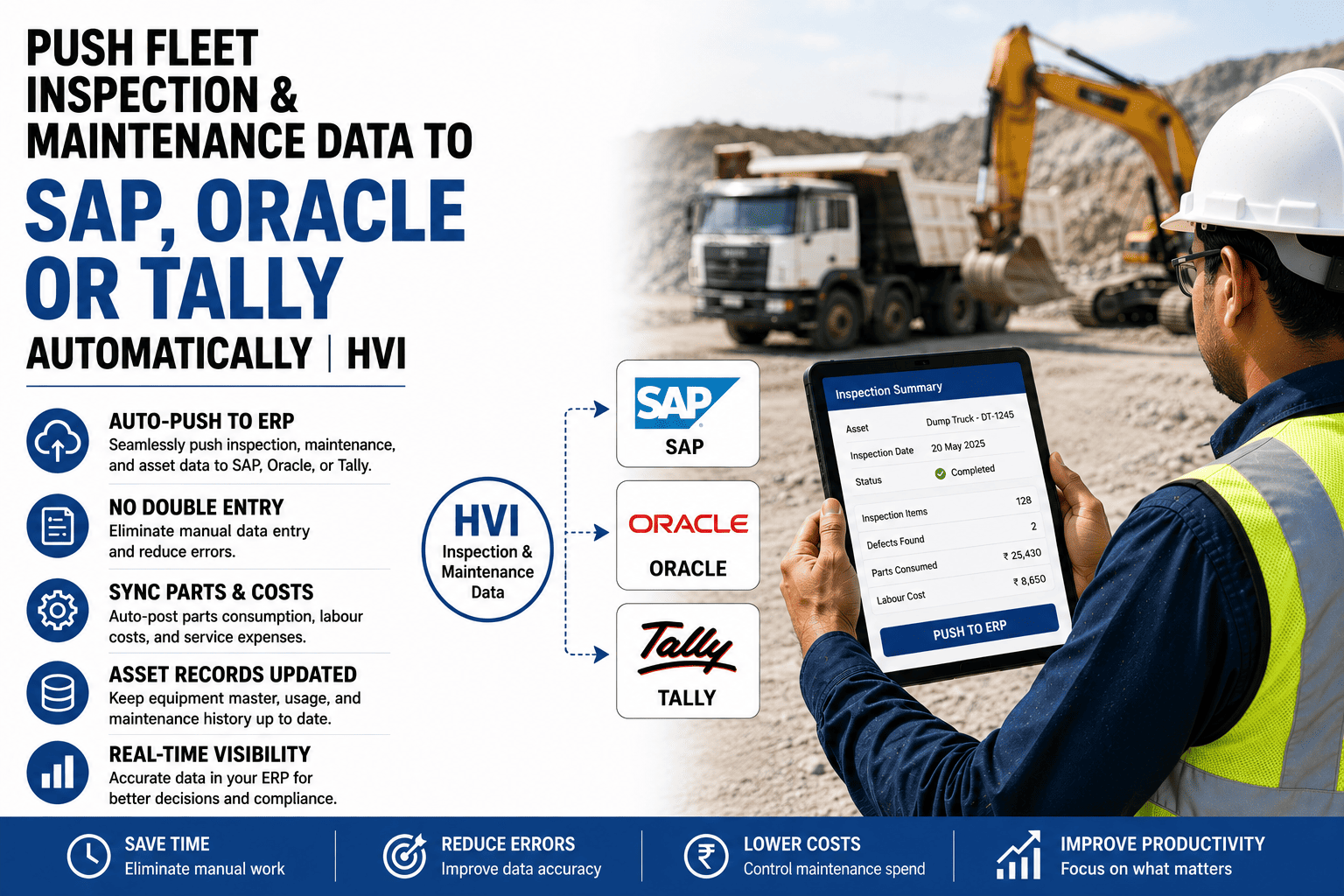
We also run Oracle and Tally at some subsidiaries. One field layer for all?
Yes — the same field capture posts to SAP at the parent, Oracle or Tally at subsidiaries, each through its own connector, while your fleet dashboards stay unified across all of them. Group-level reporting finally reads one set of field truth; see the multi-ERP setup in a 30-minute demo with our India team.
SAP Deserves Better Input Than a Clerk Reading Handwriting
Your SAP investment is only as reliable as its field data. HVI captures inspections, work orders, meter readings, and parts usage at the machine, then syncs them to SAP PM/MM with proper validation and traceability. No retyping, fewer errors, faster postings, and cleaner month-end reporting. Start free or map your SAP integration in a 30-minute session.

.png)